 NoScam
🥈 2nd place · TLN Cybersecurity Challenge 2026
An antivirus
for scams.
The scams that take the most money don't hack anything. They get you to do it yourself. NoScam runs quietly in the background and stops what a scam message tells you to do — even on a scam site made five minutes ago.
Windows · macOS · Android · Chrome, Edge and Firefox
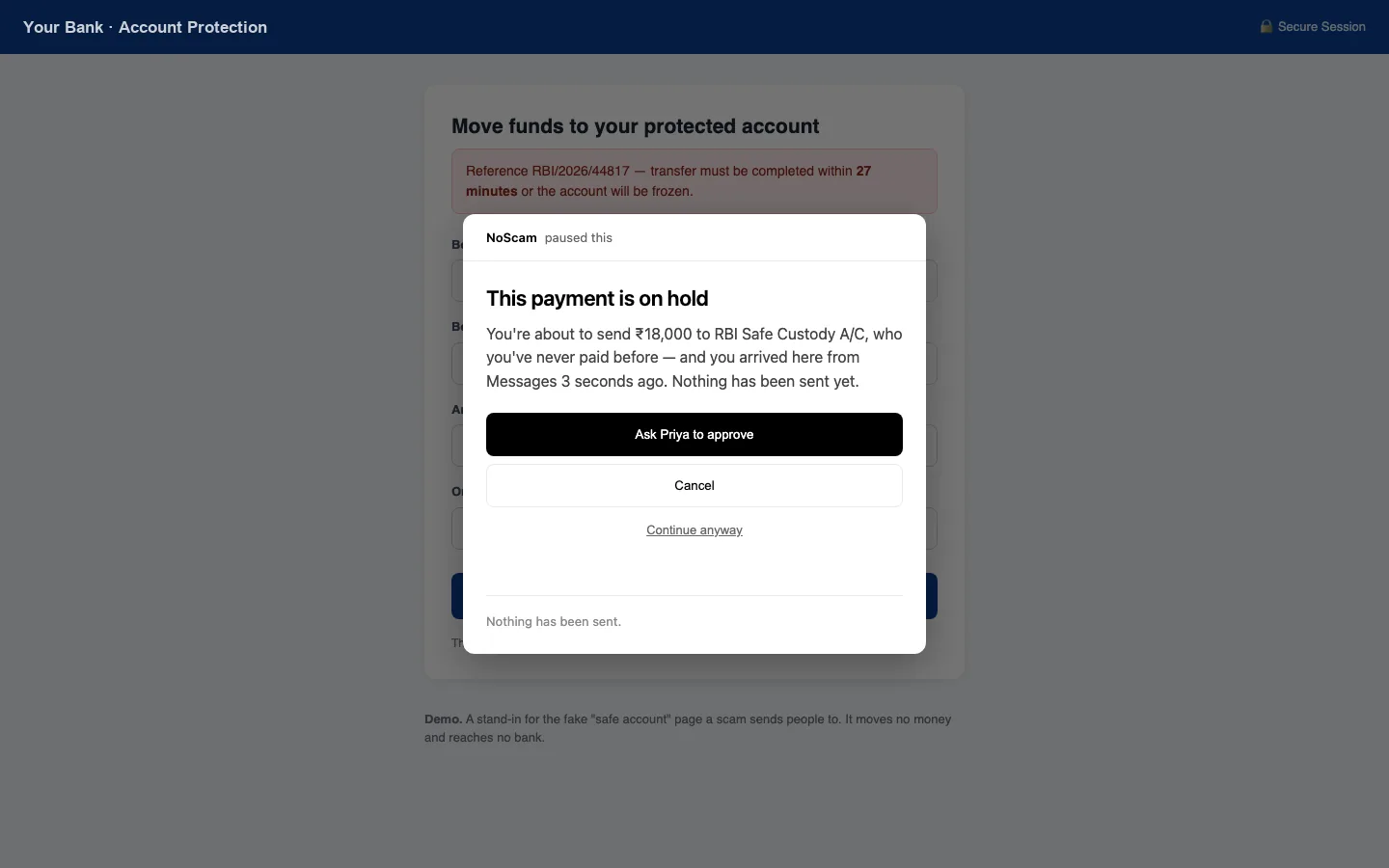
A message sent you to a page asking you to move ₹18,000. Nothing leaves until someone you trust says yes.
Antivirus asks, “is this site known to be bad?” A scam site is often brand new.
NoScam asks a question that needs no list: did a message tell you to do this?
How it works
-
01
It notices how you got there
Typed it yourself, opened a bookmark, or clicked a link in WhatsApp, Telegram, email or SMS. That one fact separates you paying your landlord from a stranger moving your money.
-
02
It holds what can't be undone
A payment to someone new, a one-time code, a password, a remote-control app — if a message sent you there, it pauses and says why, in one sentence you can check against your own memory.
-
03
Someone you trust says yes
A held payment is approved on another person's phone. The caller on the line can clone a voice and rush you. They can't press that button.
What it stops
“Move your money to a safe account”
Payments to someone you've never paid, after a message — held for approval.
“Read me the OTP”
One-time codes and passwords typed on a page a message sent you to — refused.
“Install AnyDesk so we can help”
Remote-control downloads are refused, and if one is already running, NoScam warns you.
Gift cards and crypto
Nobody legitimate is paid in gift cards. Bought after a message, they're stopped.
UPI “refunds” and AutoPay traps
A collect request sends money out. A ₹99 mandate can be ₹99 every day. Both are decoded and shown plainly.
Spy apps sent in chats Android
App files from WhatsApp are stopped before they install. Hidden apps that read your SMS or screen are found.
Quiet, like an antivirus should be
It starts with your computer and sits in the tray. Most days you never see it. It tells you plainly whether you're protected — and if the browser extension isn't connected, it says so instead of showing a green dot over nothing.
You can always continue anyway. It's a pause, not a lock — and every override is written to a history that can't be quietly edited.
Your money's details stay on your device
No account
Nothing to sign up for. Limits, payees and history live in a folder on your own machine.
No cloud decisions
Every decision is made locally by readable rules, not an AI that can be talked around.
Open source
Every line is public. Read the code or the privacy policy.
Optional features that use the network — approving from another network, the Android DNS filter, a daily update check — are off or disclosed in the privacy policy.
Download
Free for everyone. Install the app on your computer, then add the browser extension so it can see the pages you open.
Windows
Windows 10 and 11 · 21 MB
Not yet signed: if Windows says “protected your PC”, choose More info → Run anyway. A Microsoft Store version is on its way.
macOS
Apple silicon (M1 and later) · 27 MB
Not yet notarised: right-click the app and choose Open the first time. Intel Mac? Download for Intel
Android
Android 7 and later · 1 MB
Test build. Stops app files sent in chats, finds hidden spy apps and checks links. Play Store listing coming.
Browser extension
Chrome, Edge, Brave, Firefox
Store listings are in review. Until then: Chrome / Edge or Firefox zip — unzip, open chrome://extensions, turn on Developer mode, Load unpacked.
iPhone: Apple doesn't let apps work in the background like this, so on iPhone NoScam is the phone that approves — open the dashboard link the desktop app shows you.
Get updates
Store releases, the Android app on Play, and new protections. A few emails a year.